Introduction
A Hyvä Theme mobile app allows Magento merchants to deliver a fast, native shopping experience without rebuilding their frontend.
Mobile commerce has become the default shopping habit for many customers.
People compare products, read reviews, place orders, and track shipments from their phones more often than from desktops.
With Hotwire Native, you can transform your blazing-fast Hyvä Theme storefront into native iOS and Android applications while continuing to use your existing frontend.
For Magento merchants, this shift is not a trend to watch from the sidelines. It is a real business change that affects conversion rates, customer retention, and brand loyalty.
At the same time, Hyvä Theme has gained strong attention in the Magento ecosystem because it simplifies the frontend and improves performance.
That is why many businesses are now asking a practical question: if Hyvä makes the storefront faster, do we still need a mobile app? The answer is yes for many stores.
This guide explains how to build a mobile app for a Hyvä-powered Magento store.
You can read more interesting blogs by mobikul .
What is Hyvä Theme?
Hyvä Theme is a modern frontend solution for Magento 2.
It was created to replace the weight and complexity of the default Luma frontend with a much lighter and more focused stack.
Instead of depending on a large number of JavaScript libraries and legacy patterns, Hyvä uses a simpler approach that is easier to maintain and faster to load.
Introduction
Hyvä is not just a visual redesign. It is a frontend architecture shift that changes how Magento stores are rendered in the browser.
For many merchants, the biggest appeal of Hyvä is that it keeps Magento flexible while removing a lot of frontend noise.
Features
Hyvä Theme is commonly recognized for the following strengths:
- Lightweight frontend structure
- Better page speed and Core Web Vitals
- Cleaner HTML output
- Reduced dependence on large JavaScript frameworks
- Modern utility-first styling with Tailwind CSS
- Simpler interaction model with Alpine.js
- Easier frontend debugging and customization
Performance Improvements
Hyvä is popular because performance improvements are visible. Faster loading pages improve user experience, but they also support SEO and revenue goals.
Search engines reward better performance, and shoppers tend to stay longer when pages respond quickly.
Hyvä helps reduce:
- Render-blocking scripts
- Unnecessary frontend dependencies
- Large CSS bundles
- DOM complexity caused by old Magento patterns
Those improvements create a much stronger foundation for the rest of the commerce experience.
Lightweight Frontend Architecture
Hyvä’s frontend architecture is intentionally lean. It avoids the kind of stacked abstractions that often make Magento frontend work slow and difficult.
Developers can work with HTML, CSS, and small interaction layers without getting trapped in a heavy framework setup.
That also makes the storefront easier to align with mobile app development.
Developer Experience
One of the biggest reasons developers prefer Hyvä is that it reduces mental overhead.
There is less boilerplate, fewer moving pieces, and a clearer path from requirement to implementation.
This improves development speed, code readability, debugging, and reusability across projects.
Hyvä is especially attractive for teams that want Magento customization without frontend fatigue.
Why Merchants Prefer Hyvä
Merchants usually care about outcomes, not framework names. Hyvä is appealing because it helps them get:
- Faster storefronts
- Better mobile usability
- Lower frontend maintenance cost
- Improved conversion potential
- A cleaner base for future development
For growing stores, those benefits directly affect how customers browse, add products to cart, and complete purchases.
Now that we have a clear picture of Hyvä Theme, we can look at why a mobile app is the next logical step for many stores.
Why Your Hyvä Store Needs a Mobile App
Hyvä improves the web storefront, but a mobile app adds a different layer of commerce value.
The app sits closer to the customer’s daily routine and creates a more personal relationship with the brand.
Mobile-First Shopping
Shoppers increasingly use phones for product discovery and repeat purchases.
A mobile app gives them a dedicated environment that is faster to access than a browser and easier to return to than a website.
That matters because app users typically show stronger intent. They are already familiar with the brand and are more likely to complete a purchase when the experience is smooth.
Better Customer Engagement
A mobile app is not only a shopping channel. It is also a communication channel. You can use it to promote offers, highlight new arrivals, and bring customers back with personalized messages.
Compared to email or social media, an app gives you a more direct touchpoint.
Native Performance
Mobile apps can feel faster because they use native device capabilities and are built for mobile interaction patterns. This matters for product browsing, image zooming, checkout flows, and navigation.
When the shopping experience is responsive and stable, users are less likely to abandon the session.
Push Notifications
Push notifications are one of the strongest reasons to build an app. They allow merchants to communicate time-sensitive updates such as:
- Cart reminders
- Order status updates
- Flash sale alerts
- Back-in-stock notifications
- Personalized offers
Used carefully, notifications improve re-engagement without depending on paid ads every time.
Faster Checkout
Mobile app checkout can be designed to reduce friction. Saved addresses, stored preferences, digital wallet support, and a cleaner screen flow all help customers finish purchases more quickly.
For stores with high repeat order volume, that can have a direct impact on revenue.
Improved Conversion Rates
Apps often improve conversion because they reduce friction across the full shopping journey.
Customers do not need to re-enter details as often, and the UI can be optimized specifically for mobile use.
That does not mean every app converts better automatically. It means the app gives you the tools to create a better conversion path.
Better Customer Retention
Retention is where mobile apps are especially valuable. Once a customer installs the app, the store is present on the device in a more permanent way.
Offline Capabilities
Some parts of the app can be designed to work even when the network is weak or unavailable.
For example, you can cache product data, saved cart items, or recently viewed products.
Offline support is not a replacement for Magento backend connectivity, but it improves resilience.
Enhanced User Experience
Apps let you design a shopping journey that feels focused and personalized.
With better navigation, smoother transitions, and device-specific features, the store can feel more polished than a browser-based flow.
The result is a stronger brand experience around your Magento store.
With the business case in place, the next step is understanding the technical foundation required before development begins.
Prerequisites Before Building a Mobile App
Before you start development, the Magento store and API layer should be ready.
A mobile app depends on stable backend services, clean authentication, and properly exposed catalog and checkout operations.
Magento Setup
Your Magento installation should be stable and updated. The store should already have:
- Product catalog structure
- Categories and subcategories
- Customer accounts
- Payment methods
- Shipping methods
- Order processing workflow
If the backend setup is inconsistent, the app will reflect those problems quickly.
Hyvä Theme Installation
Hyvä should be installed and working on the storefront before you proceed.
While the mobile app does not directly use Hyvä in the same way the web frontend does, the theme is still important because it defines the store’s frontend direction and performance baseline.
The mobile app should align with the same brand and commerce experience.
REST APIs
REST APIs are useful for standard Magento operations and integrations. They are commonly used for:
- Customer authentication
- Cart updates
- Order retrieval
- Address management
- CMS content
You should verify which endpoints your app needs and whether custom API extensions are required.
GraphQL APIs
GraphQL is often the better choice for modern mobile apps because it can reduce over-fetching and support more flexible data requests.
For a mobile project, GraphQL often becomes the primary data layer for:
- Categories
- Products
- Filters
- Search
- Cart summary
- Checkout data
Customer Authentication
The app needs a secure login flow. This may include email/password login, token-based authentication, social login, or OTP-based onboarding depending on your business model.
Authentication should be designed carefully because it affects every user-specific action in the app.
Product APIs
Product data must be available in a structure the app can consume. This includes:
- Product name
- SKU
- Images
- Price
- Special price
- Stock status
- Description
- Related products
- Reviews
- Attributes
The better your product data model, the cleaner your app screens will be.
Cart APIs
The cart is one of the most important app workflows. You should confirm that the app can:
- Add products
- Update quantities
- Remove items
- Apply coupons
- Estimate totals
- Recalculate shipping and tax
Checkout APIs
Checkout is where many app projects succeed or fail. The app must support the Magento checkout flow in a way that feels simple on mobile while still respecting payment, shipping, and tax rules.
Hosting Requirements
Your backend should be able to handle API traffic from the app. If you expect higher mobile usage, review:
- Server capacity
- API response times
- Cache configuration
- CDN coverage
- Security rules
Development Environment
The team should work in a clean environment with access to:
- Magento staging or sandbox
- API documentation
- App build tools
- Test payment gateways
- Push notification services
- Analytics and crash reporting tools
Once these prerequisites are in place, the app architecture becomes much easier to design.
Mobile App Architecture for Hyvä Theme
A good app architecture keeps Magento, the frontend experience, and the mobile client aligned without duplicating business logic in too many places.
Magento Backend
Magento remains the system of record. It handles:
- Product data
- Pricing rules
- Inventory
- Customer accounts
- Orders
- Promotions
- Shipping and tax rules
Hyvä Frontend
Hyvä is the web storefront layer. It serves desktop and browser-based mobile shoppers with a lean, fast frontend experience.
Even though the app is a separate client, Hyvä still matters because it defines the store’s brand direction and can share the same content and commerce rules.
Mobile Application
The mobile app becomes a dedicated client for iOS, Android, or both. It is responsible for:
- Rendering screens
- Handling gestures and navigation
- Managing local state
- Requesting backend data
- Storing session information safely
API Communication
The app communicates with Magento through APIs. These requests should be organized around app screens and user actions rather than around Magento internals.
For example:
- Home screen requests banners, categories, and featured products
- Product screen requests item details and reviews
- Cart screen requests cart totals and shipping estimation
This keeps the app responsive and easier to maintain.
Authentication Flow
A secure authentication flow usually includes:
1. User signs in or registers in the app
2. Magento verifies credentials and issues a token
3. The token is stored securely on the device
4. The app sends the token with user-specific requests
5. Magento validates the token and returns personalized data
If token management is weak, the app will quickly become unstable from a user session perspective.
Data Flow
The data flow should be simple:
- Magento stores the source data
- APIs expose the data
- The app consumes the data
- Local caching reduces repeated requests
- User actions trigger updates back to Magento
That pattern keeps the app and backend synchronized.
Sync Between App and Magento
Synchronization is essential when customers make changes in the app and later continue on the website, or vice versa.
To support sync properly, the app should update Magento immediately for:
- Cart changes
- Wishlist changes
- Order placement
When state is shared consistently, customers can switch devices without losing context.
Architecture Overview
At a high level, the architecture connects the Magento backend, the API layer, the Hyvä storefront, the mobile app, the notification service, and analytics.
With the architecture defined, we can move into the actual build process.
Step-by-Step Guide to Build a Mobile App for Hyvä Theme
Hotwire Native makes it possible to convert a Hyvä storefront into a native iOS application without rebuilding the entire frontend.
Magento continues to power the backend while Hyvä renders the storefront.
The iOS application manages native navigation, app lifecycle, push notifications, deep links, and device-specific features.
Unlike a traditional WebView application, Hotwire Native converts Turbo page visits into native navigation.
Using Bridge Components, Hyvä pages can communicate with native iOS features such as product sharing, barcode scanning, location services, haptic feedback, and native toolbar actions.
Configure the Store URL
The application starts by loading the Hyvä storefront URL.
|
1 2 3 4 5 6 7 8 9 10 11 12 13 |
import HotwireNative let rootURL = URL(string: "https://store.example.com/")! private let appNavigatorDelegate = AppNavigatorDelegate() var navigator: Navigator? = Navigator( configuration: .init( name: "main", startLocation: rootURL ), delegate: appNavigatorDelegate ) |
The Navigator acts as the entry point of the application. It loads the Hyvä storefront and manages page navigation throughout the app.
For production, store the URL in Info.plist or an .xcconfig file instead of hardcoding it.
Launch the Application
The SceneDelegate creates the app window and starts the Hotwire navigator.
|
1 2 3 4 5 6 7 8 9 10 11 12 13 14 15 16 17 18 19 20 21 22 23 24 25 26 |
import HotwireNative import UIKit final class SceneDelegate: UIResponder, UIWindowSceneDelegate { var window: UIWindow? func scene( _ scene: UIScene, willConnectTo session: UISceneSession, options connectionOptions: UIScene.ConnectionOptions ) { guard let windowScene = scene as? UIWindowScene, let navigator else { return } let window = UIWindow(windowScene: windowScene) window.rootViewController = navigator.rootViewController self.window = window window.makeKeyAndVisible() navigator.start() } } |
This creates the application’s main window, sets the Hotwire Navigator as the root controller, and loads the storefront when the app launches.
Register Bridge Components
Bridge Components connect Hyvä pages with native iOS functionality.
|
1 2 3 4 5 6 7 8 9 10 |
private func configureHotwire() { Hotwire.registerBridgeComponents([ ShareComponent.self, CartComponent.self, ScannerComponent.self ]) Hotwire.config.backButtonDisplayMode = .minimal } |
Every bridge component is registered during app startup so that Hyvä pages can trigger native functionality whenever required.
Create a Native Share Component
Bridge Components receive messages from the web layer and execute native iOS actions.
|
1 2 3 4 5 6 7 8 9 10 11 12 13 14 15 16 17 18 19 20 21 |
import HotwireNative import UIKit final class ShareComponent: BridgeComponent { override class var name: String { "share" } override func onReceive(message: Message) { guard let viewController = delegate?.destination as? UIViewController else { return } let shareController = UIActivityViewController( activityItems: ["https://store.example.com"], applicationActivities: nil ) viewController.present(shareController, animated: true) } } |
This component opens the native iOS Share Sheet, allowing customers to share products directly from the application.
Connect the Hyvä Page
The JavaScript bridge sends data from the Hyvä storefront to the native iOS application.
|
1 2 3 4 5 6 7 8 9 10 11 12 13 14 |
import { BridgeComponent } from "@hotwired/hotwire-native-bridge" export default class extends BridgeComponent { static component = "share" connect() { super.connect() this.send("connect", { url: window.location.href }) } } |
The component name (share) must match the Swift bridge component so both layers can communicate successfully.
Authentication and Checkout
Magento continues to manage customer authentication, cart, and checkout sessions.
Since the web session is preserved inside the Hotwire Navigator, users can browse products, sign in,
add items to the cart, and complete checkout without requiring additional native authentication logic.
Production Checklist
Before publishing the application, verify the following:
- Configure the correct HTTPS storefront URL.
- Use separate Development, Staging, and Production configurations.
- Register all Bridge Components successfully.
- Test login, cart, checkout, and logout flows.
- Configure Push Notifications and Universal Links.
- Add required iOS permissions
Info.plist. - Disable debug logging in Release builds.
- Test payment redirects and checkout completion on real devices.
This implementation allows Hyvä to remain responsible for the storefront while the iOS application
delivers native navigation, better performance, push notifications, and seamless integration with device capabilities.
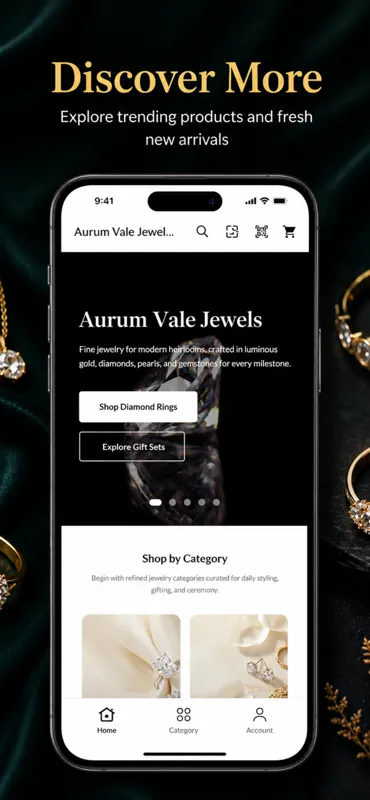
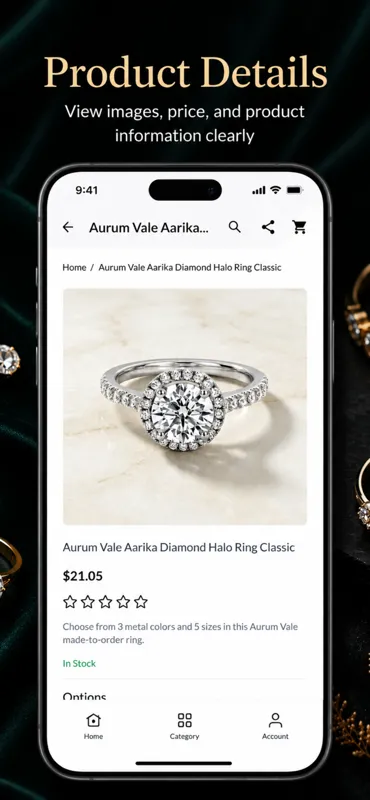
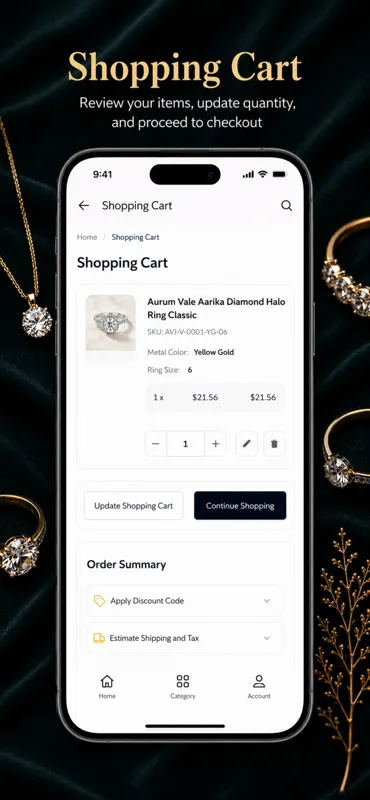
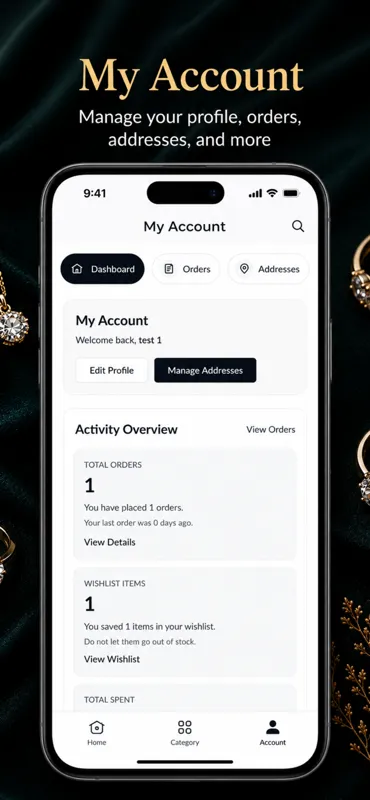
Application view

Benefits of Combining Hyvä Theme with a Mobile App
Hyvä and a mobile app are not competing solutions. They work best when they support different parts of the customer journey.
Better Business Coverage
Hyvä gives you a fast, modern storefront for browser users. The mobile app gives you a more personal channel for loyal and mobile-first shoppers.
Together, they cover more customer behaviour patterns.
Consistent Brand Experience
When the storefront and app are designed from the same commerce strategy, customers experience one brand across channels.
This consistency matters for trust, especially in high-consideration purchases.
Stronger Mobile Commerce Strategy
A Hyvä store already improves browser performance. Adding a mobile app extends that performance-minded approach into a native experience.
That gives merchants more control over retention, notifications, and repeat orders.
Better Technical Foundation
Hyvä simplifies frontend complexity. A mobile app built on clean APIs and a stable Magento backend benefits from that same discipline.
The result is a commerce stack that is easier to support and expand.
More Conversion Opportunities
Some customers prefer browsing in a browser. Others prefer an app.
By supporting both, you reduce the risk of losing users because they prefer one channel over another.
Improved Retention and Lifetime Value
The app helps bring customers back with push notifications, saved preferences, and quicker access to the store.
Over time, that can improve repeat purchase behaviour and lifetime value.
Lower Friction Across Channels
If the app syncs well with Magento, customers can move between web and mobile without losing carts, wishlists, or account data.
That creates a smoother commerce ecosystem overall.
In short, Hyvä and a mobile app solve different problems, but they reinforce each other.
Conclusion
Building a mobile app for a Hyvä-powered Magento store is a practical move for businesses that want to strengthen mobile commerce.
Hyvä improves the storefront with a lighter and faster frontend, while the app creates a dedicated mobile channel for engagement, retention, and repeat sales.
The key to success is planning the architecture properly. Magento should remain the backend system of record.
APIs should be clean and secure. Authentication should be reliable.
Core screens like home, category browsing, search, product details, cart, checkout, and account management should be designed with mobile behaviour in mind.
When performance, security, and user experience are treated as part of the same project, the result is a more powerful commerce setup.
For more updates, make sure to keep following Mobikul Blogs to learn more about mobile app development.